Video Pipeline
Vidra uses an asynchronous, queue-driven pipeline for video uploads. Files are uploaded in chunks (to handle large files and resume broken uploads), then a background FFmpeg worker picks up the job and transcodes to multiple resolutions. The API returns a 202 Accepted immediately — the video becomes available once transcoding completes.
Every uploaded video is transcoded to five resolutions: 240p, 360p, 480p, 720p, and 1080p. The player selects the best quality for the viewer's connection. The original file is also retained.
Upload & Processing Sequence
The diagram shows the full lifecycle from the initial chunk upload to the video appearing as published. The three optional post-processing steps (IPFS pinning, Whisper caption generation, and WebTorrent) only run if those features are enabled in configuration.
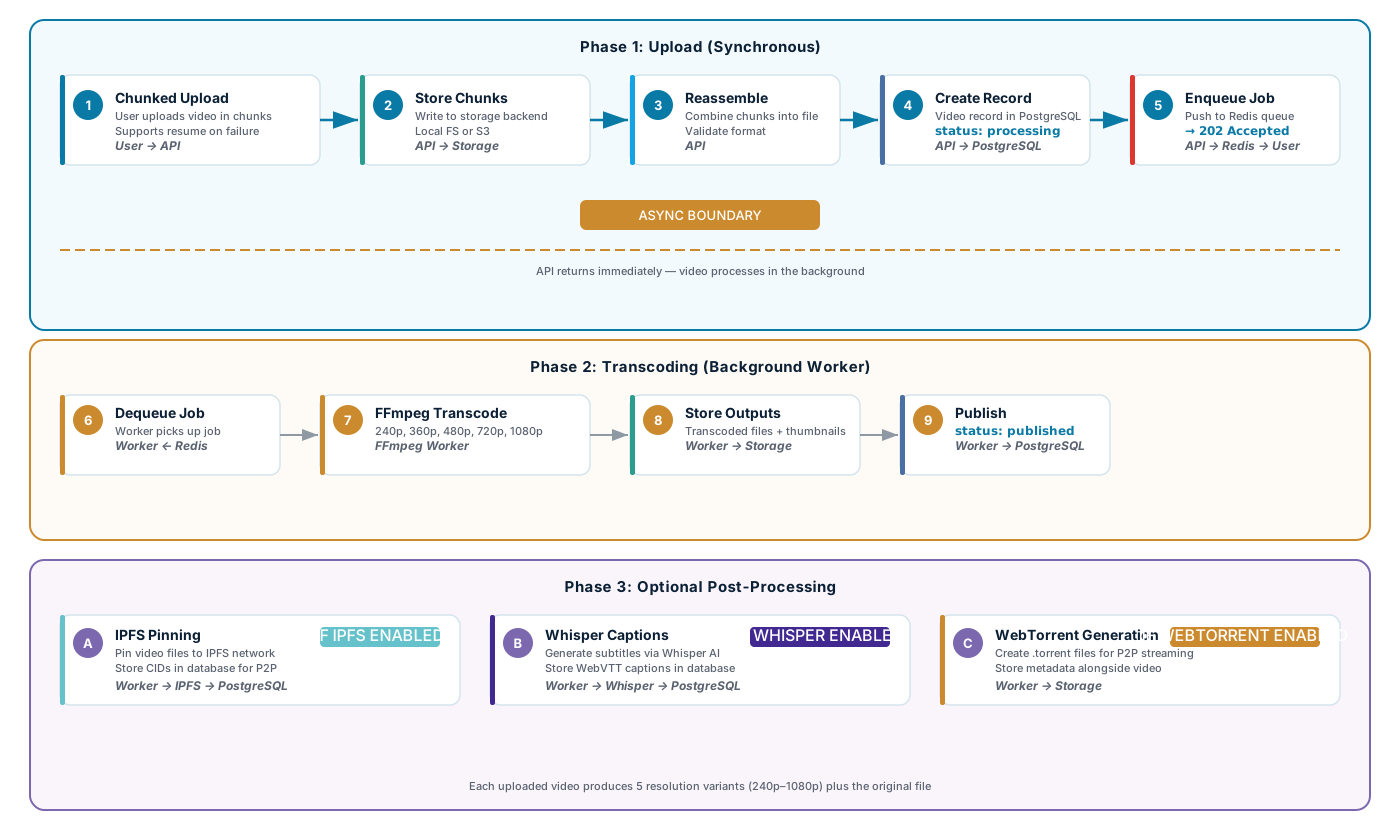
Pipeline Stages Summary
| Stage | Actor | What happens |
|---|---|---|
| Chunked upload | User → API | Client splits file into chunks and uploads sequentially. Allows resuming interrupted uploads. |
| Chunk assembly | API | Server reassembles chunks into the complete original file and validates the format. |
| Record creation | API → PostgreSQL | A video record is created with status: processing. The API returns 202 Accepted with the video ID. |
| Job enqueue | API → Redis | A transcode job is pushed to the Redis queue so the API can return immediately. |
| Dequeue & fetch | FFmpeg Worker | Worker pulls the job from the queue and fetches the original file from storage. |
| Transcoding | FFmpeg Worker | FFmpeg produces five resolution variants plus thumbnails. CPU/GPU-intensive — runs on dedicated worker nodes in production. |
| Store outputs | Worker → Storage | Transcoded files and thumbnails are written back to the same storage backend (local or S3). |
| Publish | Worker → PostgreSQL | Video record is updated to status: published. The video becomes visible to viewers. |
| IPFS pin (optional) | Worker → IPFS | If IPFS is enabled, all transcoded files are pinned and their CIDs stored in the database for P2P distribution. |
| Whisper captions (optional) | Worker → Whisper | If Whisper is enabled, the audio track is extracted and sent to the Whisper AI service for speech-to-text. The resulting WebVTT subtitles are stored in the database and served alongside the video for accessibility. |
| WebTorrent (optional) | Worker | If WebTorrent is enabled, .torrent files are generated and stored alongside the video. |